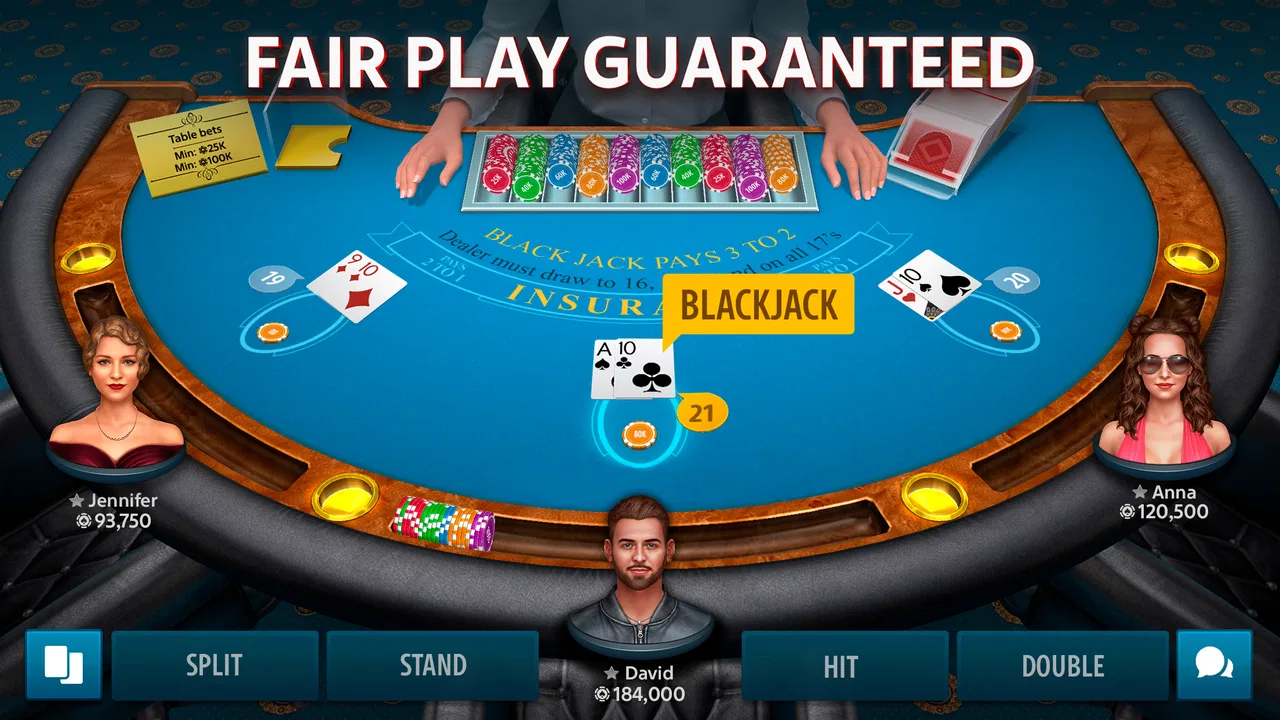
Blackjack 21: Blackjackist
- 4.5
- Rating
- 10.00M
- Installs
- Free
- Price

 Analysis by App-foxy
I found Blackjack 21: Blackjackist most interesting as a quick, shared-device card game rather than as a substitute for a real casino visit. It is built around blackjack, the familiar game where the aim is to finish closer to twenty-one than the dealer without going over. That simple idea makes it easy to hand a phone to someone else for a short session, although the presence of in-app purchases means a household should agree on boundaries before anyone starts playing.
Developed by KamaGames, this free card game has been available since October 26, 2015. Its Teen content rating is important in a family setting, not because every player will find the rules difficult, but because the casino theme and optional spending deserve a little adult judgment. I would recommend trying it when you want a polished blackjack-style distraction, provided everyone treats the virtual chips as part of the game rather than as something with real-world value.
How Blackjackist works on a shared device
When I use Blackjackist on a shared phone, I treat each hand as a clearly defined turn: one player makes the decisions, finishes the round, then passes the device along. That keeps the game easy to follow without assuming the app separates people’s accounts or progress. Before anyone starts, I’d also agree who owns the session and who can approve purchases; with those boundaries settled, the next question is whether the blackjack atmosphere itself suits your group.
You May Also Like

 Blood Strike: 2.5 Anniversary
Blood Strike’s Loadouts Turn Every Drop Into a Tactical Gamble
A close look at Blood Strike’s custom loadouts: how fast access to signature weapons reshapes its battle royale rhythm, rewards preparation, and narrows the gap between fights.

 Pandora - Music & Podcasts
Pandora’s Music Is Easy to Start, but Harder to Recover
Pandora’s strength is its low-effort path from a seed to a station. Its weak spot is how much confidence it asks you to place in connection, setup, and quiet recovery.

 8 Ball Pool
 Is Built on Rivalries, Rematches, and Routine
A close look at the rivalries, rematches, shared routines, and unanswered safety questions that turn a quick pool match into a persistent mobile community.

 Samsung Music
’s Quiet Strength Is Playing What You Already Own
Its reach comes less from spectacle than from dependable access to a personal library. That simplicity is both the app’s strongest retention engine and its ceiling.

 AccuWeather: Weather Radar
AccuWeather Review: A Quick, Clear Forecast for Everyday Decisions
For everyday plans, the best forecast is the one you can understand quickly. AccuWeather makes rain timing, radar, and local conditions easy to act on, with a few trade-offs.

 Hill Climb Racing
Why Hill Climb Racing Still Turns Crashes Into One More Run
A tiny car, a bumpy hill and one more upgrade: Hill Climb Racing keeps resurfacing because its simple chaos makes every near-miss feel personal.
More From Our News Desk
View All News


A practical game for short turns
Blackjack is naturally suited to passing a phone around. One person can play a hand, settle the result, and give the device back without asking the next player to learn a large set of controls. That makes the game workable during a quiet evening at home, while waiting for food, or during a break when several people want something more interactive than watching the same screen.
In my experience, the strongest shared-use scenario is a small group that already understands the basic rhythm of blackjack. Each player can make their own decision, such as taking another card or staying with the current total, then let the next person have a turn. The pace is more suitable for casual coordination than for a long family board-game session where every player needs a permanent place at the table.
There is also a useful social distinction here: sharing a device is not the same as sharing an account. If several people use one phone, I would decide in advance whether the game is being treated as one person’s play space or as a casual pass-and-play activity. That avoids confusion about progress, virtual currency, and whose choices are being made. I would not assume that a shared device automatically creates separate player areas.
What the blackjack format demands from players
The rules are approachable, but the decisions are not entirely mindless. A hand can look safe until one extra card changes everything, and a tempting move may be mathematically weaker than simply standing. That gives the game enough decision-making to hold attention beyond tapping through a result. It is still much lighter than a strategy-heavy card game, though, so people looking for deck construction, collectible cards, or a campaign will probably find the experience narrow.
One practical tip is to agree on a simple turn routine before passing the phone: check the total, identify whether the dealer’s visible card changes the risk, make one decision, and then hand over the device after the outcome. This keeps a shared session moving and reduces the chance that someone accidentally plays another person’s hand. It also makes the game feel less like an individual app being interrupted and more like a small household activity.
Learning without turning the room into a lesson
For a newcomer, the best approach is to explain the objective in plain language rather than reciting every possible rule at once. The player needs to understand the danger of going over twenty-one, the role of the dealer, and the meaning of the available actions. After a few hands, the interface and repeated situations do most of the teaching.
I would avoid presenting the game as a way to practise for gambling with money. The useful skill here is recognizing risk inside a defined card system, not predicting real outcomes. That distinction matters even more when a younger person is watching or asking to play. The Teen rating is a clear reason to keep the conversation age-appropriate instead of treating the casino presentation as completely neutral.
Setting boundaries before anyone taps to buy
The game is free to download, which lowers the barrier to trying it on a household phone. The important catch is that optional purchases range from $0.99 to $999.99 per item. That is a very wide range, and it changes how I would handle the app on a shared device. I would not let a child or guest play with unrestricted purchasing access, and I would make sure the device owner knows who is using the game before a session begins.
Even if nobody intends to spend, a clear rule helps: virtual chips are entertainment items, not a household budget and not a promise of cash returns. I would also separate “free to install” from “free in every situation.” The first describes access to the game; it does not remove the need to review purchase settings or account payment arrangements.
A sensible household workflow is to keep the game on the owner’s profile, avoid handing over a device while an account purchase screen is open, and check the result after any accidental tap. These are ordinary precautions rather than special Blackjackist controls. The key point is that the app should be managed through the device and account habits already used for other purchases, not through assumptions about who is holding the phone.
Keeping accounts and progress understandable
Shared use becomes awkward when players expect the app to remember them individually. Before inviting another person to play, I would explain whether their session is just a temporary turn or part of the device owner’s ongoing game. That small conversation prevents a common household problem: one player changes the state of the game, another assumes it is their own progress, and nobody knows which decisions belong to whom.
If you want genuinely separate experiences, separate device or account arrangements are clearer than repeatedly passing one phone. I would choose that option when two people care about their own progress or when one player is old enough to make independent decisions but should not be involved with another person’s payment setup. On the other hand, for a few casual hands, a single shared session is simpler and less formal.
This is one of the app’s less obvious trade-offs. Its blackjack format is easy to share physically, but the surrounding account boundary still belongs to the device owner. The game can support a friendly turn-taking habit without automatically solving identity, privacy, or purchase separation. That is not a flaw unique to the card table, but it is something I would plan for before making it a regular household activity.
Coordinating a fair household session
When several people are involved, coordination matters more than advanced strategy. I prefer deciding the order before opening the first hand and agreeing that nobody changes another player’s decision. A short timer is unnecessary; the natural pace of blackjack is already quick enough. The better rule is simply to finish the current hand before passing the device, so the next person is not dropped into the middle of someone else’s choice.
Another useful habit is to say the decision aloud: “hit,” “stand,” or whatever action the interface presents. This helps a younger or less experienced player follow the round and makes accidental taps easier to notice. It also turns the game into a small conversation rather than a silent sequence of screen presses.
For a household that enjoys comparing decisions, I would discuss the reasoning after the hand rather than criticize the result. Blackjack includes chance, so a sensible decision can still lose. That is a valuable distinction for new players: good judgment is not the same as receiving the desired outcome every time. The game works better socially when people focus on choices and expectations instead of treating each result as proof that someone played badly.
Where it fits beside other card games
Compared with solitaire, Blackjackist is more engaging when two or more people want to comment on each hand, because the dealer creates a shared point of attention. Compared with poker-style apps, it is easier to explain and less dependent on reading other human players. You are primarily making decisions against the dealer’s structure, not managing a table full of opponents with different habits.
That simplicity is also its limitation. If you want bluffing, negotiation, collectible decks, or a broad variety of card modes, a traditional multiplayer card app will offer more depth. If you want a calm solo puzzle with no casino framing, solitaire may be a better fit. I would choose Blackjackist specifically when the appeal is the blackjack format itself and the session needs to remain easy to start and easy to stop.
The casino presentation may also be a deciding factor. Some players enjoy the atmosphere and familiar vocabulary, while others would rather avoid gambling-style imagery altogether. For the latter group, a non-casino card game is the better choice even if its mechanics are less immediately recognizable. I would not recommend installing this one simply because it is free if the theme is likely to create discomfort at home.
Age, trust, and sensible supervision
The Teen rating should guide the household conversation. I would be comfortable treating the game as an age-context decision, not as a universal family recommendation. A teenager who understands that the chips are virtual and that purchases require permission may approach it differently from a young child who sees bright rewards and assumes that tapping is harmless.
Trust is more useful here than pretending the app is a neutral toy. Explain why payment boundaries exist, who owns the account, and what to do if a purchase prompt appears. If a child cannot reliably follow those rules, I would skip shared access rather than rely on a rushed explanation during play.
Adults should also be honest about their own habits. A free card game can be a pleasant diversion, but repeated attempts to recover losses or chase a better result can make the session less healthy. I would set a stopping point before playing and avoid using the app when frustrated or trying to win back something already spent. The game is best treated as a contained pastime, not as a financial activity.
Performance expectations and version context
Blackjackist currently appears as version 71.49.0 and requires Android 6.0 or later. That gives Android users a clear compatibility checkpoint before downloading. I would still install it on the device intended for play rather than assuming that an older shared phone will provide the same experience as a newer one.
The app’s scale is reflected in its average rating of 4.5 from around 266 thousand ratings, with over 10 million installs. Those figures suggest that the format has broad appeal, but they should not replace personal judgment about the casino theme, purchase boundaries, or the needs of a particular household. Popularity tells me that the core experience is established; it does not mean every player will enjoy its presentation.
There are also around 9 thousand written reviews, which is enough to show that users have had plenty to say about the experience over time. I would pay more attention to comments that match my intended use: shared-device play, purchase concerns, and the feel of short blackjack sessions. A review count alone cannot tell me whether the app suits a child, a cautious adult, or someone looking for a deeper card system.
Who should install it, and who should pass
I would recommend giving it a try if you enjoy blackjack, want a quick card game on Android, and can keep virtual purchases inside clear limits. It is especially suitable for an adult who wants a few hands during spare time or for a household that can coordinate turns without expecting separate profiles to appear automatically.
I would skip it if you are searching for a completely non-gambling-themed card game, a rich collection of different card modes, or a competitive experience built around human opponents. I would also avoid making it available on a shared device when nobody is willing to manage the account and payment boundary. The free entry point is convenient, but convenience should not be confused with suitability for every family member.
My household verdict
After using it as a blackjack-focused game, I see Blackjackist as a straightforward option for short, social turns rather than a complete card-game library. Its biggest strength is the clarity of the central activity: one hand, a few decisions, and an immediate result. That structure makes it easy to explain and easy to fit into an ordinary evening.
My main caution is the combination of a Teen rating, casino-style presentation, and in-app purchases that can reach $999.99 per item. I would install it for a suitable player, agree on account and spending rules first, and keep the shared-device arrangement simple. With those boundaries in place, it can be a fun way to play a few hands together. Without them, I would choose a less purchase-oriented card game for the household.
FAQs for Blackjack 21: Blackjackist
01What features does Blackjack 21: Blackjackist offer to enhance the gaming experience?
Blackjack 21: Blackjackist boasts a range of features designed to elevate your gaming experience. These include realistic graphics, a variety of tables to choose from, daily bonuses, and social interaction options. The app also provides a comprehensive tutorial for novices and features such as leaderboards and achievements to engage seasoned players.
02Is Blackjack 21: Blackjackist free to play, or are there in-app purchases?
Blackjack 21: Blackjackist is free to download and play. However, it offers in-app purchases for various items like chips and special features that can enhance gameplay. While these purchases can enrich your experience, they are not mandatory, and you can enjoy the game without spending money.
03Can I play Blackjack 21: Blackjackist offline, or do I need an internet connection?
Blackjack 21: Blackjackist requires an internet connection to play. This connectivity allows you to enjoy multiplayer features, participate in tournaments, and engage with friends. The online requirement ensures that all players are interacting in real-time, creating a dynamic and competitive environment.
04What platforms is Blackjack 21: Blackjackist available on, and are there any system requirements?
Blackjack 21: Blackjackist is available on both Android and iOS platforms. It requires Android 4.4 and up, or iOS 10.0 or later. The app is optimized for a smooth experience on most modern devices, but ensuring your device meets these specifications will provide the best performance.
05How does Blackjack 21: Blackjackist ensure fair play and security for its users?
Blackjack 21: Blackjackist employs advanced algorithms and security measures to ensure fair play and protect user data. The game is regulated to prevent cheating, and all transactions are secure, safeguarding your personal and financial information. Players can enjoy peace of mind while engaging in fair and competitive gameplay.
Pros
- User-friendly interface enhances gameplay.
- Realistic graphics make it immersive.
- Frequent updates keep it fresh.
- Multiplayer mode is highly engaging.
- Free chips daily for continuous play.
Cons
- Requires constant internet connection.
- In-app purchases can be costly.
- Ads can be intrusive at times.
- Limited offline features available.
- Occasional connectivity issues.

Blackjack 21: Blackjackist
Gallery